
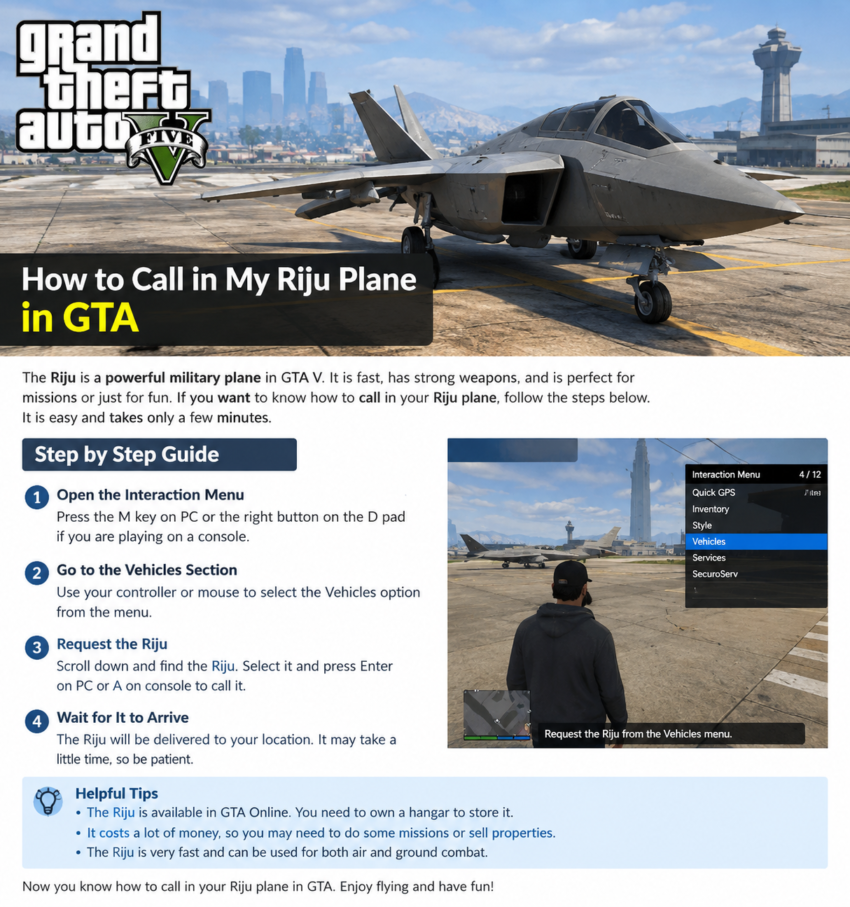
How to Call in My Riju Plane in GTA
If you are searching for how to call in my Riju plane in GTA then you are in the right place. The F-160 Raiju is a powerful fighter jet in GTA Online. It has Stealth Mode and VTOL features that make it useful for flying around Los Santos.
Calling your Raiju is easy when you know where to find it. You need to own the plane and store it as a Personal Aircraft in your Hangar.
What Is the Riju Plane in GTA?
The Riju is officially called the Mammoth F-160 Raiju. It is a fighter jet in GTA Online.
The F-160 Raiju was added to GTA Online in 2023. It can be bought from Warstock Cache & Carry.
The plane also has Stealth Mode. This feature can hide the aircraft from the minimap. The Raiju also has VTOL which lets it take off and land vertically.
How to Call in My Riju Plane in GTA
Follow these simple steps to call your Raiju.
Step 1: Open the Interaction Menu
First open the Player Interaction Menu.
1 On PC you can press and hold the M key.
2 On PlayStation you can hold the Touchpad.
3 On Xbox you can hold the View button.
Rockstar Games confirms these default controls for opening the Player Interaction Menu.
Step 2: Open the Vehicles Section
After opening the Interaction Menu look for the Vehicles option.
Select it to see the vehicle options available to you.
Step 3: Select Request Personal Aircraft
Now look for the option called Request Personal Aircraft.
Select this option to request your stored aircraft.
Rockstar has supported the Request Personal Aircraft option through the Personal Interaction Menu in GTA Online.
Step 4: Choose Your Riju
Find your F-160 Raiju in the aircraft list.
Select the Raiju and request it.
The game will then arrange a delivery location for your aircraft.
Step 5: So Go to the Aircraft
After you request the plane check your map for its location.
Travel to the aircraft and get inside.
Now you can fly your Raiju around Los Santos.
Do You Need a Hangar for the Raiju?
Yes. The Raiju is stored as a Personal Aircraft in a Hangar.
Once the aircraft is stored there you can request it through the Interaction Menu.
A Hangar is also useful because it gives you a place to store and manage your aircraft. Rockstar explains that purchased aircraft can be stored and customized in a Hangar.
Can You Call the Raiju From the Phone?
The method can be different for different aircraft.
Some aircraft can be requested through Pegasus. Personal Aircraft stored in a Hangar can be requested through the Interaction Menu.
For the F-160 Raiju you should use the Interaction Menu and then open the vehicle options to request your Personal Aircraft.
What If the Raiju Does Not Appear?
If you cannot find your Raiju then check these things:
- Make sure you actually own the Raiju.
- Make sure it is stored in your Hangar.
- Check that another Personal Aircraft is not already active.
- Open the Interaction Menu again.
- Look under the aircraft request option.
- Check your map after requesting the aircraft.
If the aircraft was destroyed then check the vehicle status before trying to request it again.
How to Open the Interaction Menu on Each Platform
The default controls are simple.
PC: Hold M
PS4 and PS5: Hold the Touchpad
Xbox One and Xbox Series X|S: Hold the View button
After opening the menu go to the vehicle options and request your Personal Aircraft. Rockstar lists these default controls in its official support guide.
Why Is the Raiju Popular?
The F-160 Raiju has several useful features.
It has Stealth Mode which can help keep the aircraft hidden from the minimap.
It also has VTOL which allows vertical takeoff and landing.
These features make the Raiju useful for players who enjoy flying fighter jets in GTA Online.
Final Thoughts
Now you know how to call in my Riju plane in GTA.
The basic method is simple. Open the Interaction Menu. Go to Vehicles. Select the option to request your Personal Aircraft. Then choose your F-160 Raiju.
Make sure your Raiju is stored in your Hangar. Once it is available as a Personal Aircraft you can request it through the Interaction Menu and start flying around Los Santos.