Easy & Complete Guide: “8171” Online Balance Check for Benazir Income Support Programme (BISP)
This guide is aimed at Pakistani beneficiaries of the Benazir Income Support Programme (BISP) or its Kafalat/Ehsaas components, explaining in simple terms how to check your payment or balance via the “8171” service, what you need, what to expect, and what to do by province.
What is BISP and what is “8171”?
-
BISP (Benazir Income Support Programme) is the Government of Pakistan’s flagship social-protection initiative for the poorest and most vulnerable households.
-
The “8171” service (SMS or web portal) is the official channel through which you can check your eligibility, payment status, balance and collection details using your CNIC.
-
It works across Pakistan: Punjab, Sindh, Khyber Pakhtunkhwa, Balochistan, Azad Jammu & Kashmir, Gilgit-Baltistan.
-
Important: BISP states that 8171 is the only official number for SMS & alerts; any message from another number may be a scam.
Why should you check your balance/status?
-
Eligibility: See if you are included for the current payment cycle.
-
Payment amount: Know how much you are to receive (or have received).
-
Payment status: Whether the payment is “Disbursed”, “Pending”, or “Ready for collection”.
-
Collection details: Where and how to collect money (bank, ATM, digital wallet, or cash centre).
-
Avoid unnecessary visits: Using the portal or SMS saves you time and travel.
-
Security: Helps you spot delays and potential fraud.
How to check via SMS (8171)
-
On your mobile phone open the SMS (text) app.
-
Type your 13-digit CNIC number (without hyphens or spaces). Example:
4220112345678. -
Send this SMS to 8171. BISP Web Portal
-
You will receive an SMS reply with your status: whether you are eligible, the amount due, collection instructions.
-
Make sure your mobile SIM is registered under your CNIC and you have enough network connectivity.
How to check via Web Portal (Online)
-
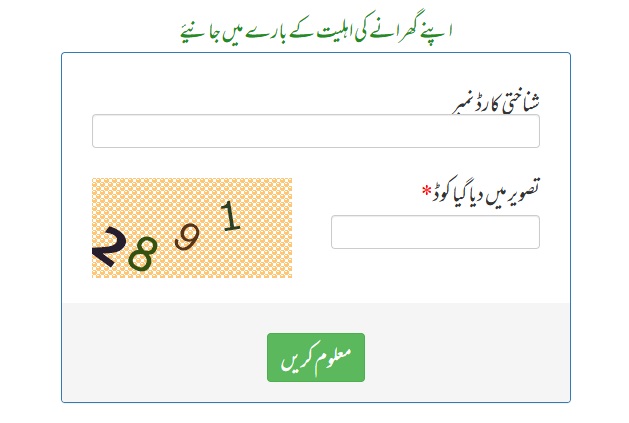
Visit the official BISP/8171 web portal (be sure it is genuine).
-
On the portal, find the option for “Check Payment Status / Balance / Eligibility”.
-
Enter your 13-digit CNIC number (no hyphens).
-
Enter captcha or verification code as required.
-
Click “Submit” (or equivalent). The portal will show:
-
Your eligibility status
-
Payment amount
-
Date of payment or release
-
Collection centre or bank/ATM details for withdrawal
-
-
If the portal shows “Record not found” or “Under verification”, then read on for troubleshooting.
Province-Wise: What to Know
Here’s how things typically work in different provinces — useful for you in Pakistan depending on where you are. (Schedules and districts may change so always check the portal/SMS.)
Punjab
-
Payments are distributed by districts in phases to manage queueing. cmp-punjab.com.pk
-
After your status is “Ready”, you can collect via bank/ATM, digital wallet or BISP cash centre.
-
Make sure your CNIC, mobile number and family records are updated.
Sindh
-
Similar phased distribution. Digital wallet and mobile verification being introduced.
-
If you are in rural areas, mobile-wallet or local cash centres may be more accessible.
Khyber Pakhtunkhwa (KPK)
-
Many districts now support biometrics and mobile wallet methods.
-
In remote areas, go to the local tehsil / BISP office if portal/SMS shows “Under verification”.
Balochistan
-
Geography and connectivity may make digital methods particularly useful here.
-
Digital wallet and geo-tracking help minimise travel and paperwork.
AJK & Gilgit-Baltistan
-
The system is extended here too. Make sure to check via SMS or portal since physical centres may be fewer.
Troubleshooting & Common Issues
-
If you get “Record Not Found” or “Verification Pending”: your NSER data may be incomplete, mobile number not registered, or CNIC expired.
-
SMS not received? Ensure your SIM is registered to your CNIC, check network, resend.
-
Portal shows error? Try clearing browser cache, use incognito, or try later.
-
Payment ready but not received? Check if district phase is completed, or payment channel (bank/wallet) is correct.
-
Scams warning: Many users report receiving fake messages or links asking for fees. > “Obviously it is a scam, … just block those numbers.”
-
If you have linked mobile wallet and still haven’t received funds, check your wallet app or visit your wallet service centre.
FAQ (Frequently Asked Questions)
Q1. Is there a fee to use 8171 SMS or portal?
A. No, the service is free. SMS cost (if any) is from your mobile network. Official registration & checking are free.
Q2. What is the latest payment amount?
A. As of 2025, the regular quarterly payment has increased; many reports show Rs 13,500.
Q3. If I’m marked not eligible, what can I do?
A. The portal/SMS may show reasons. You might need to update your family data, mobile number, CNIC, or income/asset info. Then check again after updating via your local BISP or NADRA.
Q4. Can I receive payment via digital wallet?
A. Yes — with recent upgrades, you may link your CNIC to a mobile wallet account and receive disbursement there.
Q5. How can I avoid scams?
A. Only trust SMS from 8171 and website 8171.bisp.gov.pk (or official BISP portal). Never pay an agent or share your OTP, CNIC, or bank details with unknown persons.
Summary
Using the 8171 service of BISP is the easiest and quickest way to check your eligibility and payment status while staying at home. You can use SMS or the web portal — both just need your CNIC. Be sure to use official channels, keep your mobile and CNIC details updated, and follow the instructions from the SMS or portal for collection.
آسان اور مکمل رہنما: بینظیر انکم سپورٹ پروگرام (BISP) 8171 – کے ذریعے آن لائن بیلنس چیک کریں
پاکستان میں معاشی مدد کے لیے چلنے والے مشہور پروگرامز میں سے ایک ہے BISP یعنی بینظیر انکم سپورٹ پروگرام۔ اگر آپ اس پروگرام کے کسی فائدہ اٹھانے والے ہیں اور جاننا چاہتے ہیں کہ 8171 کے ذریعے اپنا بیلنس کیسے چیک کریں، تو یہ آرٹیکل آپ کے لیے ہے۔
BISP اور 8171 کیا ہے؟
-
BISP حکومتِ پاکستان کا سماجی تحفظ کا ادارہ ہے، جو مستحق خاندانوں کو مالی امداد فراہم کرتا ہے۔
-
“8171” وہ عدد ہے جس کے ذریعے آپ SMS یا آن لائن پورٹل پر اپنا بیلنس، ادائیگی کی حیثیت، اور اہل ہونے کا حال معلوم کر سکتے ہیں۔
-
یہ سہولت خاص طور پر ان خاندانوں کے لیے ہے جنہیں بینظیر کفالت پروگرام یا دیگر امدادی پروگراموں کے تحت ادائیگیاں ملتی ہیں۔
کیوں ضروری ہے بیلنس چیک کرنا؟
-
ادائیگی کی تاریخ جاننے کے لیے۔
-
اگر رقم ابھی نہیں آئی تو معلوم ہو سکے کہ کیا وجہ ہے۔
-
مستقبل کی ادائیگی کا اندازہ ہو سکے۔
-
کوئی غیر قانونی کاوش یا دھوکہ دہی سے بچا جائے۔
کیسے کریں بیلنس چیک؟
SMS کے ذریعے
-
اپنا 13 ہندسوں والا CNIC نمبر لکھیں (مثلاً: 4220112345678)۔ BISP Web Portal+1
-
اس نمبر کو 8171 پر SMS کریں۔ bisp-8171.pk+1
-
چند منٹوں میں آپ کو جواب موصول ہوگا، جس میں لکھا ہوگا کہ آپ اہل ہیں یا نہیں، رقم کب ادا کی جائے گی، کتنی رقم باقی ہے وغیرہ۔
-
اس بات کا خیال رکھیں: یہ سروس مفت ہے (یا بہت کم خرچہ اگر موبائل نیٹورک نے چارج کیا ہو) اور صرف 8171 نمبر سے کی جائے۔
آن لائن پورٹل کے ذریعے
-
اپنے موبائل یا کمپیوٹر پر انٹرنیٹ کنکشن سے ویب براؤزر کھولیں۔
-
ادائیگی جاننے کے لیے درست پورٹل کھولیں (مثلاً: 8171.bisp.gov.pk یا جو سرکاری لنک دیا گیا ہو)۔
-
CNIC نمبر درج کریں (13 ہندسوں میں، ہائفن یا اسپیس کے بغیر)۔ BISP Web Portal
-
CAPTCHA (جوڑ شدہ عداد یا لفظ) حل کریں۔
-
“Submit” یا “چیک کریں” بٹن پر کلک کریں۔
-
اس کے بعد اسکرین پر آپ کی اہلیت، ادائیگی کی رقم، رقم کب جاری کی جائے گی اور جمع کروانے والا مرکز (ٹاؤنشپ، بینک، ایجنسی وغیرہ) نظر آئے گا۔
اگر بیلنس نظر نہ آئے تو کیا کریں؟
-
کئی بار “Record not found” یا “Under verification” کا پیغام آتا ہے، اس کا مطلب ہے کہ آپ کا ڈیٹا ابھی مکمل نہیں ہوا۔ BISP Web Portal
-
CNIC نمبر دوبارہ چیک کریں کہ لکھنے میں غلطی نہ ہو۔
-
موبائل نمبر رجسٹرڈ ہے یا نہیں، اس کی تصدیق کریں۔
-
اگر 24–48 گھنٹوں میں بھی جواب نہ آئے، تو قریبی BISP یا ایہساس آفس جائیں۔
-
ہمیشہ سرکاری ویب سائٹ یا سرکاری ہیلپ لائن استعمال کریں — دھوکہ دہی اور جعلی لنکس سے بچیں۔
رقم کی ادائیگی اور نکالنے کا طریقہ
-
جب آپ کا بیلنس “Ready for collection” ہو جائے، تو متعلقہ بینک یا ادائیگی مرکز (مثلاً HBL یا دیگر ایجنٹ) میں جائیں۔
-
اپنا اصل CNIC ساتھ لے جائیں۔
-
بایومیٹرک یا دیگر شناختی طریقہ کار انجام دیا جائے گا۔
-
اگر ATM کارڈ جاری ہوا ہے، تو وہ بھی استعمال ہو سکتا ہے۔
اہم حفاظتی نکات
-
اپنا CNIC، موبائل نمبر، یا بینک کا راز کسی کو نہ بتائیں۔ سرکاری عملے کے علاوہ کسی کو OTP یا PIN نہ دیں۔
-
صرف سرکاری لنکس اور آفیشل نمبروں (جیسے 0800-26477) سے رابطہ کریں۔ BISP Web Portal
-
کسی بھی اجنبی ویب سائٹ یا لنک پر CNIC نہ لکھیں۔
-
اگر کوئی ایجنٹ ادائیگی کے بدلے رقم طلب کر رہا ہے، تو فوراً رپورٹ کریں۔
خلاصہ
اگر آپ BISP کے تحت مالی معاونت کے اہل ہیں، تو 8171 کا استعمال کر کے گھر بیٹھے اپنا بیلنس آسانی سے جان سکتے ہیں — چاہے موبائل SMS کے ذریعے ہو یا آن لائن پورٹل کے ذریعے۔ ان طریقوں سے ادائیگی کی تاریخ، رقم اور مرکز کا پتہ چلتا ہے۔ صرف یاد رکھیں: CNIC درست لکھیں، آفیشل چینلز استعمال کریں، اور کسی بھی اجنبی لنک یا فرمائش سے ہوش میں رہیں